
Here’s something most business owners don’t want to admit: the strategy isn’t usually the problem. The systems are.
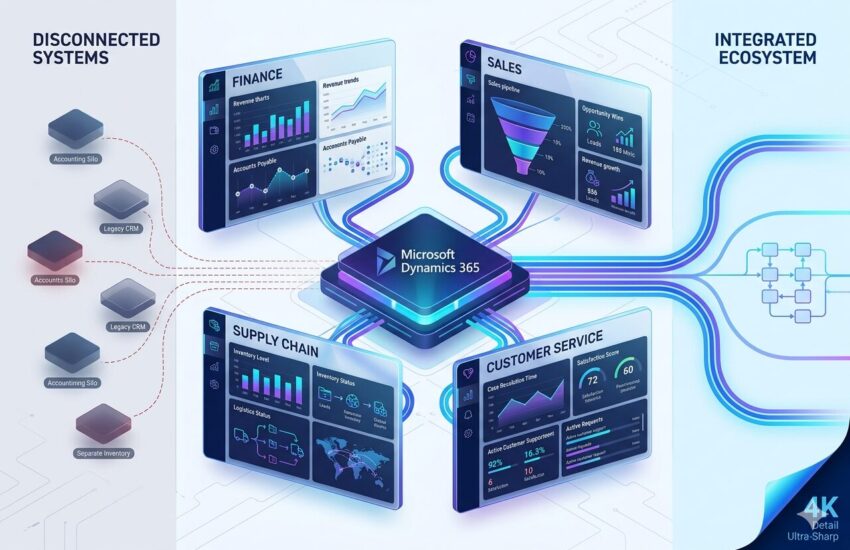
Finance is on one platform. Sales uses something else. The warehouse team is working from another spreadsheet. By the time leadership sees a report, it’s two days old, and the numbers aren’t relevant anymore. That gap, right there, is where bad decisions get made.
Microsoft Dynamics 365 ERP Integration fixes the problem at the root. Instead of forcing manual exports, it pulls finance, supply chain, sales, and customer service into a single working environment. Information moves where it needs to go without someone manually pushing it. When something changes in one part of the business, the rest of the business sees it.
For companies that actually want to scale, the question stopped being “should we integrate?” a while ago. The question now is how to do it without shutting down operations in the process.
ERPOcean specializes in exactly that. The team has done this work across different industries and knows where ERP projects usually fall apart.
What is Microsoft Dynamics 365 and ERP Systems?
Dynamics 365 is Microsoft’s cloud-based suite for business operations. It covers ERP and CRM territory and connects directly with the rest of the Microsoft stack: Azure, Teams, Power BI, Office 365. The advantage there is obvious if your organization already lives in that ecosystem.
It’s modular. A company can start with Finance, leave Supply Chain for later, and add Customer Service when the team is ready. There’s no obligation to deploy everything at once, which matters a lot for businesses that can’t afford a big-bang go-live.
The Role of ERP in Modern Business
ERP is the backbone of how operations actually run in mid-size and large companies. The core idea: centralize data so decisions aren’t made on partial information.
Without it, procurement orders materials based on inventory numbers that haven’t been updated. Sales promises a delivery window the warehouse can’t hit. Nobody’s lying. They’re just working from different, disconnected versions of the truth. That’s a structural problem, not a people problem, and an ERP system is the structural fix.
Microsoft Dynamics ERP Solutions create a single source of truth for the whole organization. Every department, same data, updated continuously.
How to Choose the Right Microsoft Dynamics Partner?
Most businesses underestimate how much this decision matters. Dynamics 365 has the potential to run almost anything, but the actual value depends entirely on how it’s set up.
A good Microsoft Dynamics partner knows your industry and asks uncomfortable questions about current workflows. ERPOcean approaches it that way.
Requirement analysis comes before configuration. The integrations that actually work long-term are the ones built on an honest read of what a business needs, not a template dropped in and handed over.
What Is ERP Integration and Why It Matters?
The Simple Definition
ERP integration connects your ERP to everything else your business runs on: eCommerce platforms, CRM, HR tools, third-party logistics, payment gateways. The goal is to stop data from sitting in separate buckets and start having it flow automatically between systems.
Eliminating Silos Through ERP System Integration
Data silos have a real cost. And it’s usually not obvious until someone tries to add it up. A sales rep who can’t see live inventory sells something that isn’t available. A finance team manually reconciling data across three platforms burns hours every week on work that a connected system would handle in seconds.
ERP system integration removes those friction points. When a customer order updates in the CRM, the ERP sees it without anyone doing anything. When inventory drops below a reorder threshold, procurement gets triggered automatically. Nobody has to send an email.
The Business Case for Enterprise Resource Planning Integration
Enterprise resource planning integration delivers in a few areas that are easy to measure:
- Fewer manual errors in invoicing and order processing
- Faster financial close because reconciliation is mostly automatic
- Demand forecasting that actually reflects what sales, inventory, and supply data are all saying at once
- Less IT overhead from maintaining systems that were never meant to work together
The scaling piece is what tends to change the conversation for leadership. An integrated business can grow transaction volume without growing the headcount needed to process it.
Key Benefits of Microsoft Dynamics 365 ERP Integration
Improved Operational Efficiency
The most immediate win from integration is usually time. Specifically, the time that people stop spending on manual, repetitive work.
- Purchase orders are generated when inventory hits a reorder point.
- Invoices post when deliveries are confirmed.
- Reports pull live data instead of requiring someone to build them from exports that are already out of date by the time they’re assembled.
Staff end up doing less administrative work. For operations teams that have been buried in process overhead, that shift is meaningful. Microsoft Dynamics 365 ERP Integration helps businesses streamline business operations in a real way, not a brochure way. The difference shows up in headcount efficiency as volume grows.
Better Cross-Team Collaboration
A sales rep and a warehouse supervisor are working on the same order from completely different systems. When those systems aren’t connected, their coordination happens through emails, phone calls, and spreadsheets passed back and forth. It works, barely, until something goes wrong.
Integration changes the dynamic. When everyone is looking at the same underlying data, conversations shift. Instead of “what does your system show?”, the conversation becomes “here’s what we need to do.” That’s what cross-department collaboration actually looks like when it’s working.
Handoffs get cleaner. Escalations happen faster. Teams stop spending half their energy reconstructing context from the previous handoff.
Real-Time Data and Insights
Decisions made on last week’s data are, effectively, decisions made blind. That sounds obvious but it describes how a lot of businesses are actually operating.
Integrated Dynamics 365 deployments pull live data from across the business into centralized dashboards: finance, sales pipeline, inventory status, service tickets, all of it in one place. Finance doesn’t wait for end-of-month close to see cash position. Operations can track fulfillment rates as orders move. The faster access to accurate data means leadership is acting on what’s actually happening.
Scalable Cloud Solutions
Cloud ERP integration means the infrastructure grows with the business without a capital project attached to each growth phase. No server room to maintain. No capacity planning headaches ahead of seasonal spikes.
Users can work from anywhere, which is less of a nice-to-have than it used to be. For companies with distributed teams, regional offices, or seasonal workforce swings, cloud-based Dynamics 365 removes the friction that traditionally came with enterprise software.
Core Components and Modules of Dynamics 365 ERP
Dynamics 365 ERP modules are built to cover the main operational areas of a business, and more importantly, to share data between those areas automatically.
| Module | What It Handles |
| Finance | General ledger, accounts payable/receivable, budgeting, financial reporting |
| Supply Chain Management | Procurement, inventory, warehouse operations, logistics |
| Sales | Lead management, opportunity tracking, quotes, order management |
| Customer Service | Case management, service scheduling, customer communication |
| Field Service | Work order management, technician scheduling, asset tracking |
| Human Resources | Employee records, leave management, benefits administration |
What makes these worth deploying together is how the data connects across them. A sales order triggers inventory checks in the Supply Chain. Finance sees revenue impact the moment an order closes. Customer Service can pull full order history without calling anyone.
Individual modules do their job fine. Modules running together change how the whole business operates. That’s the actual value being bought.
ERP Implementation Process with Dynamics 365
How a Solid Implementation Actually Works?
There’s no generic ERP rollout. Every business has existing processes, legacy systems, and operational constraints that shape what the end state needs to look like. A structured implementation process takes that seriously instead of pretending a template fits everywhere.
A responsible Dynamics 365 deployment typically moves through four phases:
- Requirement Analysis
Before any configuration touches the system, the team maps existing workflows, identifies what’s broken, and defines what the integrated system needs to do. This step catches problems early. The ones caught here are cheap to fix. The ones that surface after go-live are not.
- Planning and Design
With requirements documented, the project builds a roadmap. Which modules, what integrations, how the data model is structured, what the timeline looks like. This is where scope gets locked down, and where a good partner is honest about what’s going to be hard.
- Integration and Customization
This is where the technical work happens. APIs get configured, connectors get built, data mappings get established. Where standard functionality doesn’t fit the business, customization fills the gap. Good implementations keep custom code to a minimum because custom code is maintenance work forever.
- Testing and Deployment
Before go-live, the system runs through user acceptance testing with actual staff using actual scenarios. Issues that come up in testing are far cheaper to address than issues that come up on the first live day.
Why ERP Implementation Services Matter?
ERP projects fail more often in planning and change management than in technical execution. ERP implementation services that include project management, proper training, and real post-go-live support are the difference between a system that gets used and one that gets quietly abandoned six months after launch.
Microsoft Dynamics consulting services from a team like ERPOcean bring both technical depth and implementation experience. That combination means fewer surprises and faster time to actual value.
Modern ERP Integration Trends: API-First Approach
What “API-First” Actually Means?
Traditional ERP integrations were built point-to-point: one custom connector between System A and System B. It worked until one system updated, and then the connector broke. Rebuilding it was a project. That happened repeatedly.
An API-first approach works differently. Each system exposes a standardized API layer. Other systems connect to that API, not to the system internals. When the underlying system updates, the API stays stable and the integrations keep working. The connector doesn’t break because it was never touching the parts that changed.
Why This Changes ERP Connectivity?
For businesses running multiple platforms, this is a meaningful shift. An API-first ERP connects to new tools without major rework. Adding a new logistics provider or eCommerce platform is a configuration task, not a development project.
It also means integrations are easier to maintain. When APIs are standardized and documented, you don’t need specialists who know the internals of every system in the stack.
Key advantages of going API-first:
- New systems can be integrated without rebuilding existing connections
- Platforms can update without breaking integrations
- Data flows across the integration layer are easier to track and troubleshoot
- Smaller teams can maintain what was previously specialist work
ERP Systems Are Evolving to Meet This
Dynamics 365 was built with APIs from the beginning. The Power Platform connector library and native REST APIs make it one of the more integration-friendly enterprise platforms available. That matters when the business adds new tools over time, which every growing business does.
To understand how modern systems are evolving, explore the detailed guide on API-first ERP integration approaches.
Challenges in ERP Integration and How to Overcome Them
Integration projects don’t fail because the technology doesn’t work. They fail because the technology meets real-world complexity that the project wasn’t prepared for.
Data Migration
Moving data out of legacy systems is consistently one of the harder parts of any ERP project. Old data is messy. Fields don’t map cleanly. Records get duplicated over years of manual entry. Some data needs to be cleaned before it can be migrated at all.
The businesses that handle this well audit their data before the project starts. They build a migration plan that accounts for cleanup work, run test migrations before cutover, and don’t treat data quality as someone else’s problem.
Compatibility Issues
Older on-premise systems don’t always connect easily to cloud platforms. Some internal tools were custom-built and have no API at all. Integration work for those scenarios takes longer and costs more than connecting two modern SaaS platforms. A good ERP consulting services team calls this out early with honest estimates, not optimistic timelines that collapse during execution.
User Adoption
This is the most underestimated challenge on most integration projects. A well-configured system that the team doesn’t use is a failed implementation regardless of how technically sound it is.
Training, communication, support during go-live, follow-up after launch: these aren’t optional additions to the project budget. They’re part of the project. Users who understand why the system works the way it does adopt it. Users who feel it was imposed on them find workarounds.
ERP consulting services teams have seen these patterns across many implementations. Working with experienced consultants doesn’t eliminate risk, but it means not learning the expensive lessons for the first time on your rollout.
Why Choose Microsoft Dynamics 365 Services for Integration?
Microsoft Dynamics 365 services give businesses access to a platform that’s actively developed, well-supported, and connected to the Microsoft ecosystem most organizations already use day-to-day.
That matters over the long term. A platform with a clear development roadmap and broad adoption stays current. Support is available. People with the right skills are findable. An obscure platform might be cheaper upfront and expensive forever.
Microsoft Dynamics services are also genuinely customizable without requiring heavy custom development. The platform can be shaped to fit industry-specific workflows in ways that keep maintenance manageable down the road.
Scalability is built in rather than bolted on. A company that starts with Finance and Sales can add Supply Chain and Customer Service as operations grow. There’s no need to migrate to a new platform mid-growth cycle, which is its own kind of disruption.
For businesses planning to operate at a significantly larger scale in the next three to five years, Dynamics 365 is a platform they won’t outgrow on that timeline.
Why Choose ERPOcean for Dynamics 365 ERP Integration?
ERPOcean works specifically in Microsoft Dynamics services. The team isn’t a generalist IT firm that also does ERP on the side. Dynamics 365 deployments and integrations are the work.
That focus shows up in how projects run:
- Requirement analysis comes before configuration, not after. The team understands the business before touching the system.
- End-to-end support means the engagement doesn’t end at handoff. Post-deployment is part of the model, not an upsell.
- Scope is managed honestly. The team tells clients what an integration will actually take, including the parts that are going to be harder than expected.
For businesses evaluating ERP partners, the useful question is: does this team have real experience with my type of integration, and will they tell me when something is more complicated than the initial estimate suggested? ERPOcean answers yes to both.
Conclusion
Disconnected systems cost more than most businesses calculate. The cost shows up in manual work, in errors, in decisions made on data that’s already out of date by the time anyone sees it. Microsoft Dynamics 365 ERP Integration addresses this directly, connecting the tools and processes that run operations into a single environment where information moves the way the business does.
The efficiency gains are measurable. The improvement in cross-department collaboration is real. And the quality of decisions improves when leadership has access to live data instead of reports assembled two days ago.
Getting there requires more than software. It requires a structured implementation, honest project management, and a partner who’s done this before and knows where things go sideways.