
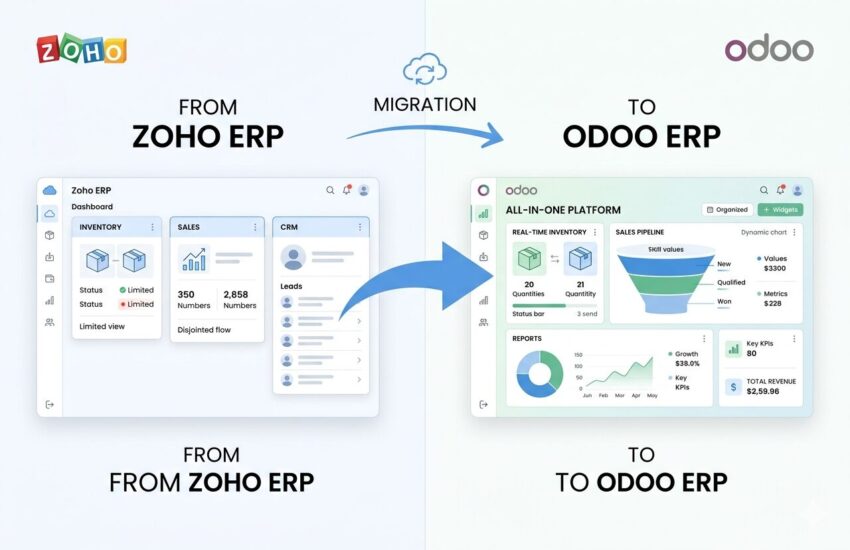
A lot of growing businesses start with Zoho ERP software, and it works until it does not. The moment your data silos start growing faster than your sales team, you know a change is due. That is exactly where switching to the Odoo ERP system makes a real difference.
Businesses across the globe are moving away from fragmented tools toward platforms that give them full control. The switch from Zoho ERP to Odoo is one of the most talked-about moves right now and for good reason. In this blog, we break down five practical ways this migration reshapes how your sales and inventory work. Let us get into it.
1. Real-Time Inventory Visibility Replaces Guesswork
One of the biggest pain points with the Zoho ERP system is that inventory updates often lag behind actual warehouse movement. Your sales team ends up quoting stock that is already gone or worse, holding back on deals because they are not sure what is available. That creates friction no business can afford.
When you move to Odoo through proper Odoo migration services, you get a warehouse module that updates stock in real time across multiple locations. Each product movement, from receipt to delivery, is reflected instantly across the system. This way, your sales reps always have an accurate picture before they even pick up the phone.
Not only that, but Odoo allows you to set reorder rules based on minimum stock thresholds. The system automatically triggers purchase orders without anyone needing to chase them manually. That alone saves hours every week for mid-to-large operations.
| Feature | Zoho ERP System | Odoo ERP System |
| Stock update frequency | Delayed / manual sync | Real-time, automatic |
| Multi-warehouse support | Limited | Full multi-warehouse management |
| Auto reorder rules | Basic | Customizable threshold-based rules |
| Inventory valuation | Standard costing | FIFO, AVCO, standard costing |
| Lot / Serial tracking | Partial | Full tracking with traceability |
This level of stock clarity directly feeds your sales confidence. When your team knows what is in the warehouse right now, not yesterday, they close deals faster. That is the kind of operational tightness you get with a proper ERP implementation on Odoo.
2. A Smarter Lead Management System Drives Actual Revenue
Managing leads inside Zoho ERP software is functional, but it often stays siloed from your inventory and order pipeline. Your sales team tracks a lead in CRM while someone else manages the quotation in a different module. The handoff between stages is clunky, and deals slip through the gaps.
Odoo brings your CRM, sales, and inventory under one roof. The lead management system in Odoo is designed to follow a deal from the first contact all the way to invoice generation without switching tabs or tools. Your salesperson can see stock availability right inside the CRM record. That is a workflow change that cuts the back-and-forth by a significant margin.
Likewise, pipeline stages in Odoo CRM are fully customizable. You can build stages that match your actual sales cycle, not a generic template someone else designed. Therefore, your team does not have to adapt to the software; the software adapts to them.
Pro Tip: During your Odoo data migration services process, make sure all existing Zoho CRM lead records, including notes, attachments, and stage history, are mapped correctly to Odoo’s CRM module. A trusted Odoo migration service provider will run a full data audit before the live cutover to prevent data loss.
| Lead Management Capability | Zoho ERP | Odoo ERP |
| CRM + Inventory link | Separate modules, manual sync | Natively connected |
| Quotation from CRM | Requires manual data entry | One-click quotation from the lead |
| Sales pipeline customization | Moderate | Fully drag-and-drop configurable |
| Activity scheduling | Basic reminders | Activities, chatter, scheduled actions |
| Revenue forecasting | Requires add-on | Built into probability scoring |
3. Cloud ERP Migration Means Your Data Goes Wherever You Go
Here is something worth thinking about: how accessible is your current ERP when your team is on the road, at a client site, or working remotely? With many Zoho ERP configurations, remote access is possible, but the experience is often inconsistent. Reports load slowly, modules feel clunky on mobile, and your field team ends up entering data retroactively from memory.
Cloud ERP migration to Odoo solves this. The Odoo platform is cloud-native, meaning it is built from the ground up to work smoothly across devices. Your sales manager can approve a quotation from their phone while at a trade show. Your warehouse supervisor can log a stock transfer from a tablet on the floor. Everything syncs in real time across the board.
For businesses in India specifically, this shift matters. The demand for Odoo data migration services in India has risen sharply primarily because Indian businesses operate across multiple cities, time zones, and teams. A cloud-based Odoo ERP system removes geography from the equation entirely. This way, your team in Mumbai and your warehouse in Pune are always on the same page.
| Accessibility Factor | Zoho ERP (On-premise/Hybrid) | Odoo (Cloud ERP) |
| Mobile access quality | Limited or inconsistent | Fully responsive, app available |
| Real-time sync across locations | Depends on configuration | Built-in, always on |
| Remote team collaboration | Siloed per module | Unified chatter, shared dashboards |
| Uptime SLA | Varies by plan | 99.9% on Odoo.sh and cloud hosting |
| Data backup and recovery | Manual or scheduled | Automated daily backups |
4. ERP Migration Services Unlock Better Sales Reporting
If your current Zoho ERP system gives you sales reports that feel like they are always a step behind, you are not imagining it. Zoho’s reporting is decent for its purpose, but when you scale, the gap between what you need and what you get starts to show. Custom reports require workarounds, third-party tools, or expensive consultants to configure something basic.
When you go through proper ERP migration services and land on Odoo, the reporting shift is night and day. Odoo’s sales dashboard shows you your pipeline value, win rate, average deal size, and team performance all in one view, without needing a data analyst to set it up. You can slice data by salesperson, product category, region, or time period with just a few clicks.
Therefore, decisions that used to take a board meeting’s worth of discussion can now be made on the spot. Your sales head can see which product lines are moving, which leads are stalling, and which reps need support, all from a single screen. That is not a feature; that is a management shift.
Useful Odoo Reporting Modules Post-Migration:
- sale.report — Sales analysis with grouping by date, salesperson, and product
- stock.quant — Real-time inventory valuation per location
- crm.lead — Pipeline stage analysis and conversion tracking
- account.move — Revenue recognition and invoice status reports
- purchase.report — Vendor performance and procurement trend tracking
During any business data migration from Zoho to Odoo, your historical sales data must come across cleanly. This is where working with an experienced Odoo migration service provider pays off. They map your old data schema to Odoo’s structure so your reports on day one include years of history, not just data from the go-live date.
| Reporting Capability | Zoho ERP Software | Odoo ERP System |
| Sales pipeline dashboard | Standard, limited customization | Fully customizable kanban + graph views |
| Inventory turnover reports | Requires third-party or manual | Built-in with product-level drill-down |
| Custom report builder | Extra cost / developer needed | Built-in studio + reporting engine |
| Historical data import | Depends on migration tool | Full historical data migration supported |
| Forecasting module | Limited native support | Built-in AI-assisted sales forecasting |
5. Secure ERP Migration Protects Your Sales and Inventory Data
This one does not get talked about enough. When businesses think about ERP implementation, they focus on features and cost — but data security during and after the migration is just as critical. Migrating years of customer records, pricing data, supplier contracts, and inventory history is not a process you want to rush or hand to someone inexperienced.
A secure ERP migration from Zoho to Odoo involves several layers of protection. First, all data is encrypted during transfer. Second, access roles in Odoo are configured before go-live, so users only see what they need to see. Third, a rollback plan is always kept ready in case something does not go as expected during cutover.
Working with the right Odoo migration service provider means these checks are not optional; they are part of the process. Likewise, Odoo’s built-in audit logs let you track every data change after migration. This way, you always know who did what and when.
| Security Consideration | During Migration | Post-Migration in Odoo |
| Data encryption | TLS/SSL during transfer | At-rest encryption on Odoo.sh |
| Access control setup | Pre-configured before go-live | Role-based permissions per module |
| Audit trail | Migration logs maintained | Full chatter and audit log history |
| Rollback plan | Database snapshots at each stage | Version control on Odoo.sh |
| Compliance readiness | GDPR, IT Act compliance check | Configurable data retention policies |
For businesses using Odoo data migration services in India, compliance with local data protection norms is also part of this conversation. A good migration partner will cover this, not leave it as an afterthought.
What the Migration Process Actually Looks Like?
A lot of businesses hesitate to migrate because they picture weeks of downtime and endless confusion. The reality, when handled by the right team, is far more structured than that. Here is what a standard Zoho-to-Odoo migration timeline looks like:
| Phase | Activity | Typical Duration |
| Phase 1 — Discovery | Current system audit, data mapping, requirements gathering | 1-2 weeks |
| Phase 2 — Data Preparation | Data cleaning, deduplication, export from Zoho | 1-2 weeks |
| Phase 3 — Odoo Setup | Module configuration, custom field setup, user roles | 2-4 weeks |
| Phase 4 — Data Import | Test migration, validation, error resolution | 1-2 weeks |
| Phase 5 — UAT & Training | User acceptance testing, team training sessions | 1-2 weeks |
| Phase 6 — Go-Live & Support | Live cutover, hypercare support, monitoring | 1-3 weeks |
The entire process typically runs between 6 to 12 weeks, depending on the complexity of your existing Zoho ERP system and how much historical data needs to be moved. That is far shorter than most people expect.
Time to Stop Managing Around Your ERP
Here is the truth: no ERP system is perfect forever. The Zoho ERP software you started with was the right call at that stage. But if your sales team is working around it instead of with it, and your inventory numbers are always a day late, then you are managing the software rather than the business.
Switching to Odoo is not just a tech upgrade. It is a decision to give your team better tools, a tighter lead management system, cleaner inventory data, and reporting that actually helps you lead. The ERP migration services available today make this transition far less painful than it used to be. And with the right Odoo migration service provider, your data comes across clean, your team gets trained, and you go live with confidence.
Encourage readers to explore Odoo integration for better collaboration to connect teams and processes seamlessly.
At ERPOcean (erpocean.com), we have helped businesses across industries move from Zoho to Odoo without losing a single critical record. Our Odoo implementation and integration services are built around your specific workflows, not a one-size-fits-all template. If you are ready to talk through what migration would look like for your business, reach out to us. We will walk you through it step by step, no pressure.
FAQ’S